
Table of Contents
[ad_1]
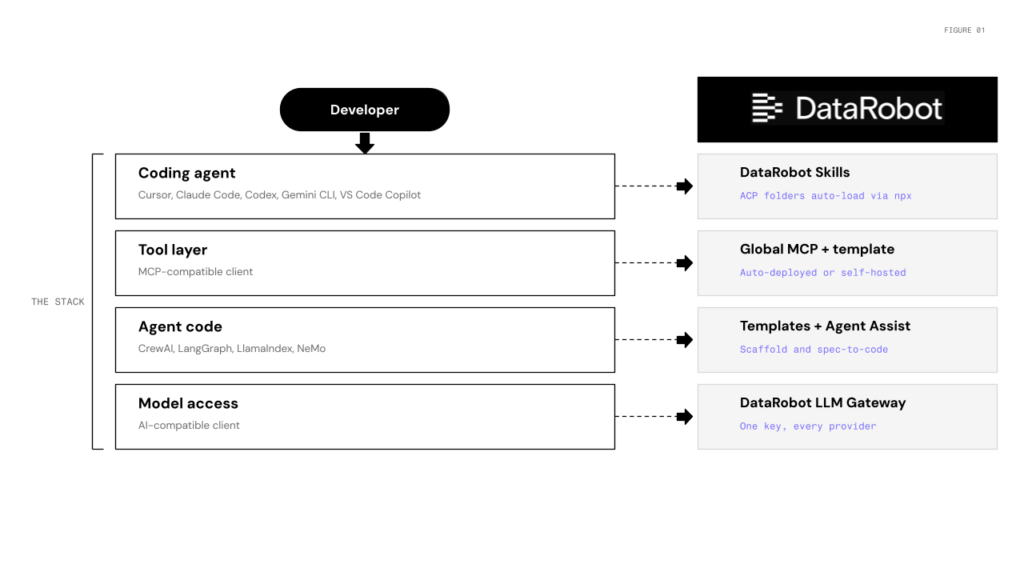
You shouldn’t have to leave Cursor to build, deploy, or monitor a production-grade agent. You can wire together LangChain, a vector DB, a monitoring tool, and a deployment pipeline yourself, but you’ll spend more time on that plumbing than on the agent itself. DataRobot is the shortcut. It now lives where you build, integrating directly into your IDE across the coding agent, tool layer, and model gateway.
Picture what this unlocks. A platform engineer at a fintech company wires up the Global MCP, points their existing LangGraph agent at it, and ships a governed deployment with monitoring and tracing all before lunch, without touching their agent code.
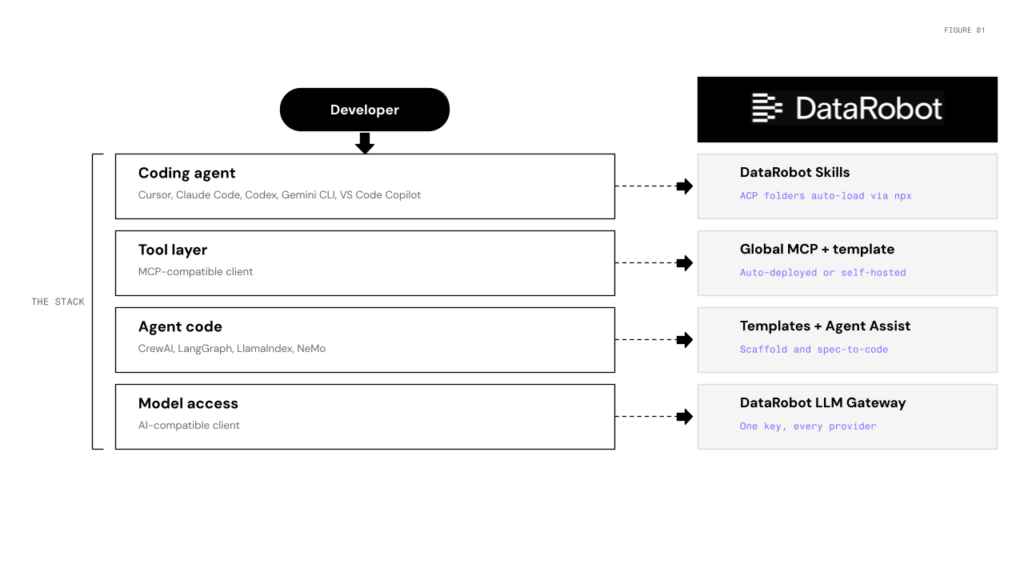
DataRobot is the pathway to that workflow. Four pieces, one per layer of the stack:
Skills: drop DataRobot expertise into any coding agent
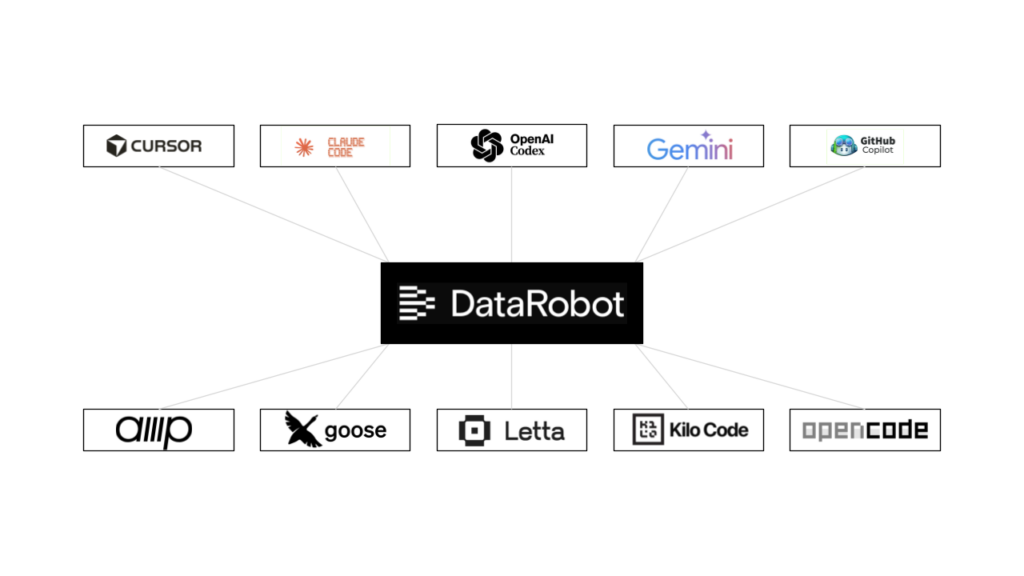
datarobot-agent-skills ships Agent Context Protocol folders for the things developers ask DataRobot to do: model training, predictions, deployment, feature engineering, monitoring, explainability, data prep. One install reaches Claude Code, Cursor, Codex, Gemini CLI, Amp, VS Code Copilot, Goose, Letta, Kilo Code, and OpenCode:
npx ai-agent-skills install datarobot-oss/datarobot-agent-skillsAfter that, “create a customer churn project and start AutoML” works in your IDE without memorizing the SDK pattern. DataRobot is also in the Cursor marketplace for one-click install.
Use DataRobot from any MCP client
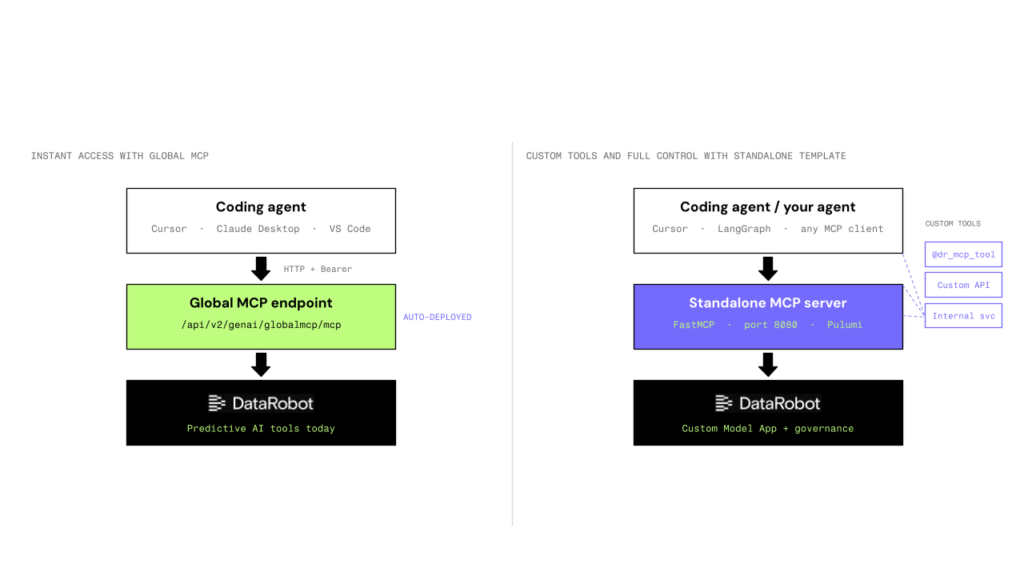
The Global MCP is auto-deployed to every DataRobot instance. Five lines in .cursor/mcp.json and you’re done:
{
  "mcpServers": {
    "datarobot-mcp": {
      "url": "
      "headers": { "Authorization": "Bearer " }
    }
  }
}
Need custom tools or internal services exposed over MCP? The af-component-datarobot-mcp template is a FastMCP scaffold with @dr_mcp_tool decorators and Pulumi-managed deployment as a Custom Model App. Local on port 8080, production on DataRobot serverless.
Agents stop containing tool code. They ask the server what’s available and call it when they need it.
That’s the architectural payoff: add or change tools without redeploying the agent. See the LangGraph integration pattern for the mcp_tools property that auto-converts MCP tools into LangChain tools.
Go from spec to governed deployment — templates, Agent Assist, and the LLM Gateway
datarobot-agent-templates provides scaffolds for CrewAI, LangGraph, and LlamaIndex. Each one ships with Pulumi infrastructure, a dev server, OpenTelemetry tracing, and the necessary plumbing that turns a local agent into a governed DataRobot deployment.
Agent Assist (dr assist) is the design-before-you-code path. It walks through agent specification, generates agent_spec.md, simulates tool-calling so you can validate model and tool choice without burning real LLM calls, then scaffolds against the templates.
Underneath all of it: the LLM Gateway, an OpenAI-compatible endpoint at {DATAROBOT_URL}/api/v2/genai/llmgw. Agents written against the OpenAI Python SDK work as-is. Switching providers is a model-string change. Metering, governance, and credentialing happen at the gateway. All four interfaces share auth through a documented credential resolution order, with separate Personal, Application, and Agent API key types when you need scoped service-to-service calls.
How it’s composed
In Cursor: install Skills, clone a LangGraph template, point your OpenAI client at the LLM Gateway, expose tools via Global MCP, run dr task run deploy. Result: a governed DataRobot deployment with monitoring and tracing.
Every capability available in the DataRobot UI is also available to your IDE and CI pipeline, so you can choose the surface that fits the task.
Get started
[ad_2]
Source link


