
Table of Contents
[ad_1]
In this article, you will learn how vector databases work, from the basic idea of similarity search to the indexing strategies that make large-scale retrieval practical.
Topics we will cover include:
- How embeddings turn unstructured data into vectors that can be searched by similarity.
- How vector databases support nearest neighbor search, metadata filtering, and hybrid retrieval.
- How indexing techniques such as HNSW, IVF, and PQ help vector search scale in production.
Let’s not waste any more time.
Vector Databases Explained in 3 Levels of Difficulty
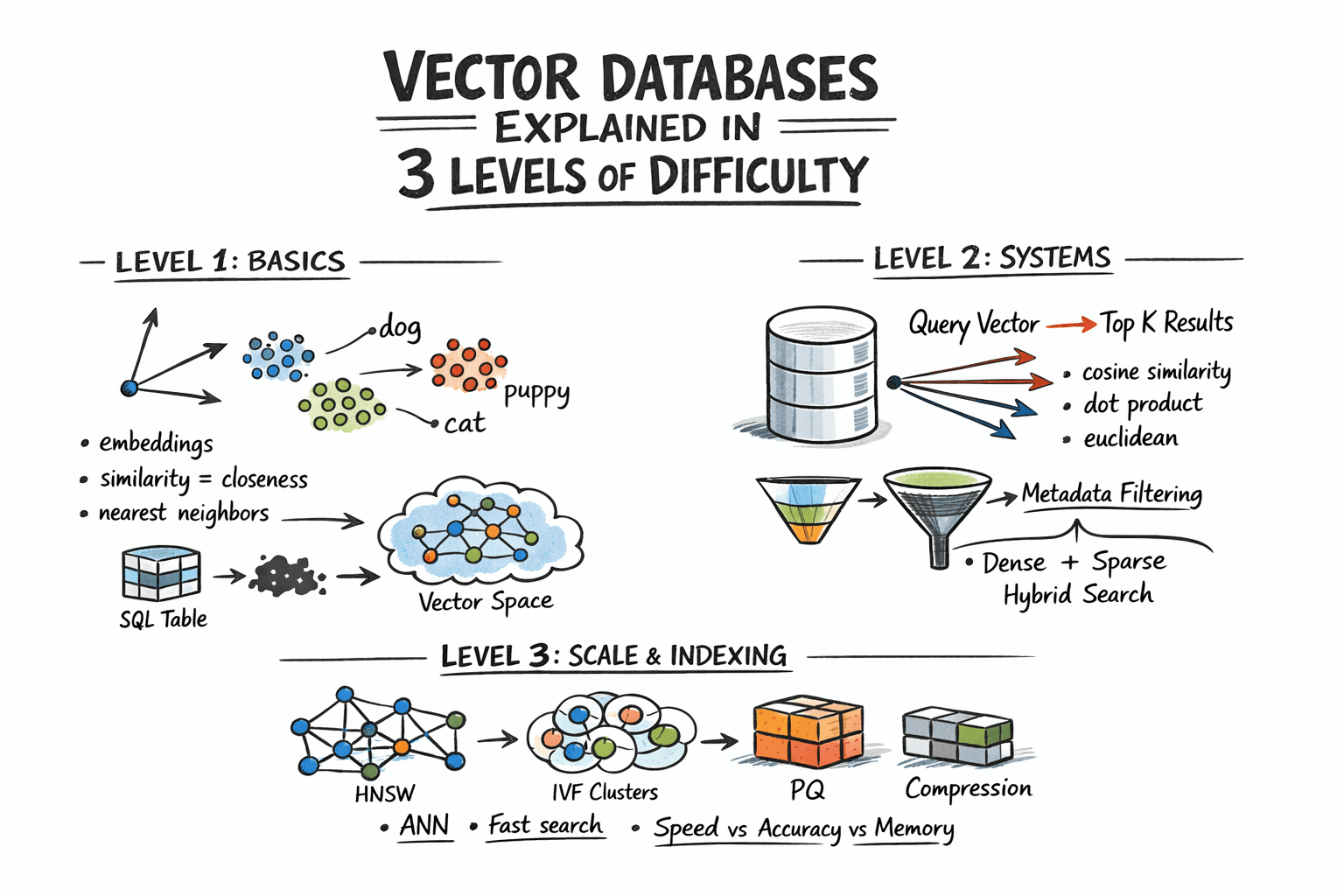
Image by Author
Introduction
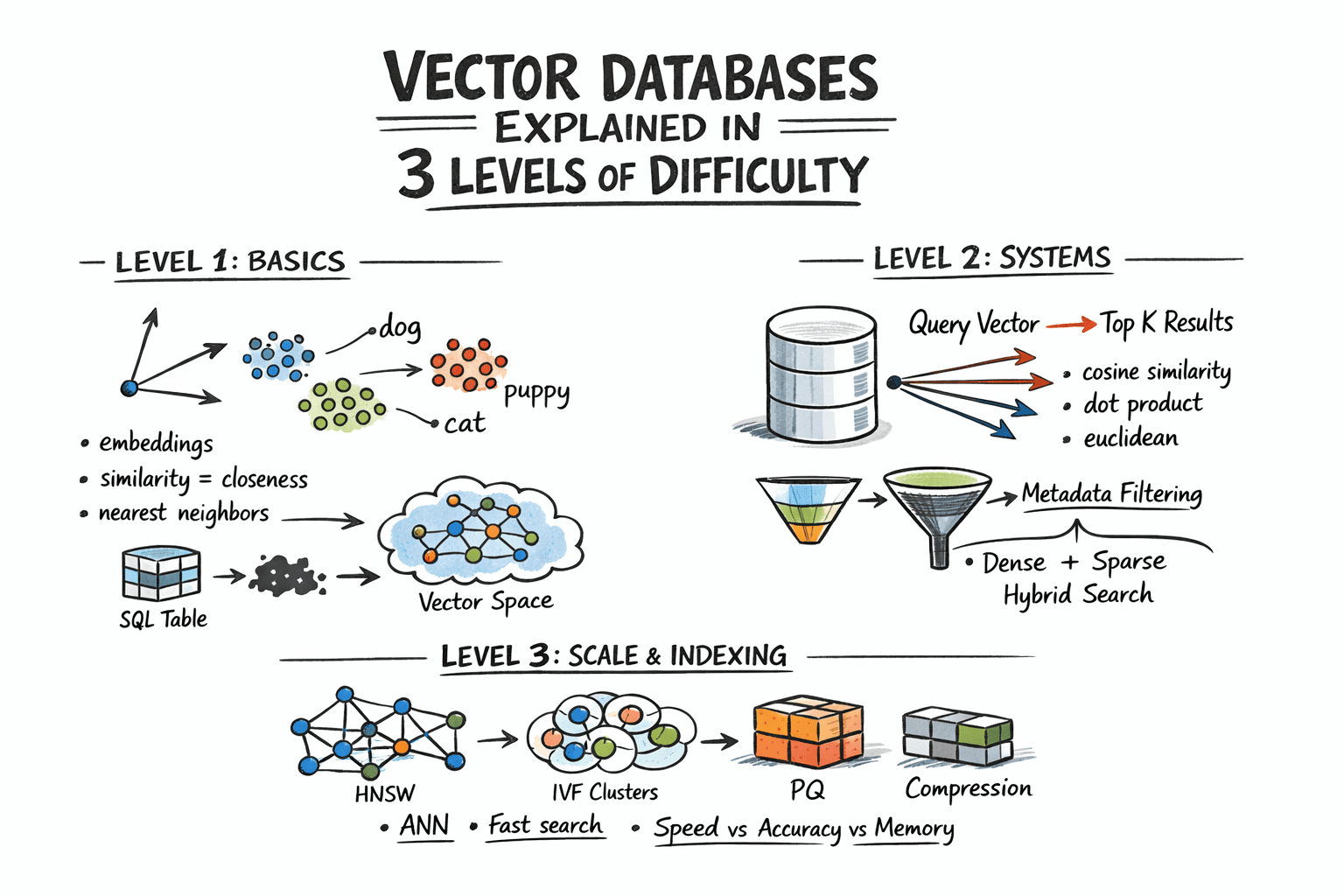
Traditional databases answer a well-defined question: does the record matching these criteria exist? Vector databases answer a different one: which records are most similar to this? This shift matters because a huge class of modern data — documents, images, user behavior, audio — cannot be searched by exact match. So the right query is not “find this,” but “find what is close to this.” Embedding models make this possible by converting raw content into vectors, where geometric proximity corresponds to semantic similarity.
The problem, however, is scale. Comparing a query vector against every stored vector means billions of floating-point operations at production data sizes, and that math makes real-time search impractical. Vector databases solve this with approximate nearest neighbor algorithms that skip the vast majority of candidates and still return results nearly identical to an exhaustive search, at a fraction of the cost.
This article explains how that works at three levels: the core similarity problem and what vectors enable, how production systems store and query embeddings with filtering and hybrid search, and finally the indexing algorithms and architecture decisions that make it all work at scale.
Level 1: Understanding the Similarity Problem
Traditional databases store structured data — rows, columns, integers, strings — and retrieve it with exact lookups or range queries. SQL is fast and precise for this. But a lot of real-world data is not structured. Text documents, images, audio, and user behavior logs do not fit neatly into columns, and “exact match” is the wrong query for them.
The solution is to represent this data as vectors: fixed-length arrays of floating-point numbers. An embedding model like OpenAI’s text-embedding-3-small, or a vision model for images, converts raw content into a vector that captures its semantic meaning. Similar content produces similar vectors. For example, the word “dog” and the word “puppy” end up geometrically close in vector space. A photo of a cat and a drawing of a cat also end up close.
A vector database stores these embeddings and lets you search by similarity: “find me the 10 vectors closest to this query vector.” This is called nearest neighbor search.
Level 2: Storing and Querying Vectors
Embeddings
Before a vector database can do anything, content needs to be converted into vectors. This is done by embedding models — neural networks that map input into a dense vector space, typically with 256 to 4096 dimensions depending on the model. The specific numbers in the vector do not have direct interpretations; what matters is the geometry: close vectors mean similar content.
You call an embedding API or run a model yourself, get back an array of floats, and store that array alongside your document metadata.
Distance Metrics
Similarity is measured as geometric distance between vectors. Three metrics are common:
- Cosine similarity measures the angle between two vectors, ignoring magnitude. It is often used for text embeddings, where direction matters more than length.
- Euclidean distance measures straight-line distance in vector space. It is useful when magnitude carries meaning.
- Dot product is fast and works well when vectors are normalized. Many embedding models are trained to use it.
The choice of metric should match how your embedding model was trained. Using the wrong metric degrades result quality.
The Nearest Neighbor Problem
Finding exact nearest neighbors is trivial in small datasets: compute the distance from the query to every vector, sort the results, and return the top K. This is called brute-force or flat search, and it is 100% accurate. It also scales linearly with dataset size. At 10 million vectors with 1536 dimensions each, a flat search is too slow for real-time queries.
The solution is approximate nearest neighbor (ANN) algorithms. These trade a small amount of accuracy for large gains in speed. Production vector databases run ANN algorithms under the hood. The specific algorithms, their parameters, and their tradeoffs are what we will examine in the next level.
Metadata Filtering
Pure vector search returns the most semantically similar items globally. In practice, you usually want something closer to: “find the most similar documents that belong to this user and were created after this date.” That is hybrid retrieval: vector similarity combined with attribute filters.
Implementations vary. Pre-filtering applies the attribute filter first, then runs ANN on the remaining subset. Post-filtering runs ANN first, then filters the results. Pre-filtering is more accurate but more expensive for selective queries. Most production databases use some variant of pre-filtering with smart indexing to keep it fast.
Hybrid Search: Dense + Sparse
Pure dense vector search can miss keyword-level precision. A query for “GPT-5 release date” might semantically drift toward general AI topics rather than the specific document containing the exact phrase. Hybrid search combines dense ANN with sparse retrieval (BM25 or TF-IDF) to get semantic understanding and keyword precision together.
The standard approach is to run dense and sparse search in parallel, then combine scores using reciprocal rank fusion (RRF) — a rank-based merging algorithm that does not require score normalization. Most production systems now support hybrid search natively.
Level 3: Indexing for Scale
Approximate Nearest Neighbor Algorithms
The three most important approximate nearest neighbor algorithms each occupy a different point on the tradeoff surface between speed, memory usage, and recall.
Hierarchical navigable small world (HNSW) builds a multi-layer graph where each vector is a node, with edges connecting similar neighbors. Higher layers are sparse and enable fast long-range traversal; lower layers are denser for precise local search. At query time, the algorithm hops through this graph toward the nearest neighbors. HNSW is fast, memory-hungry, and delivers excellent recall. It is the default in many modern systems.
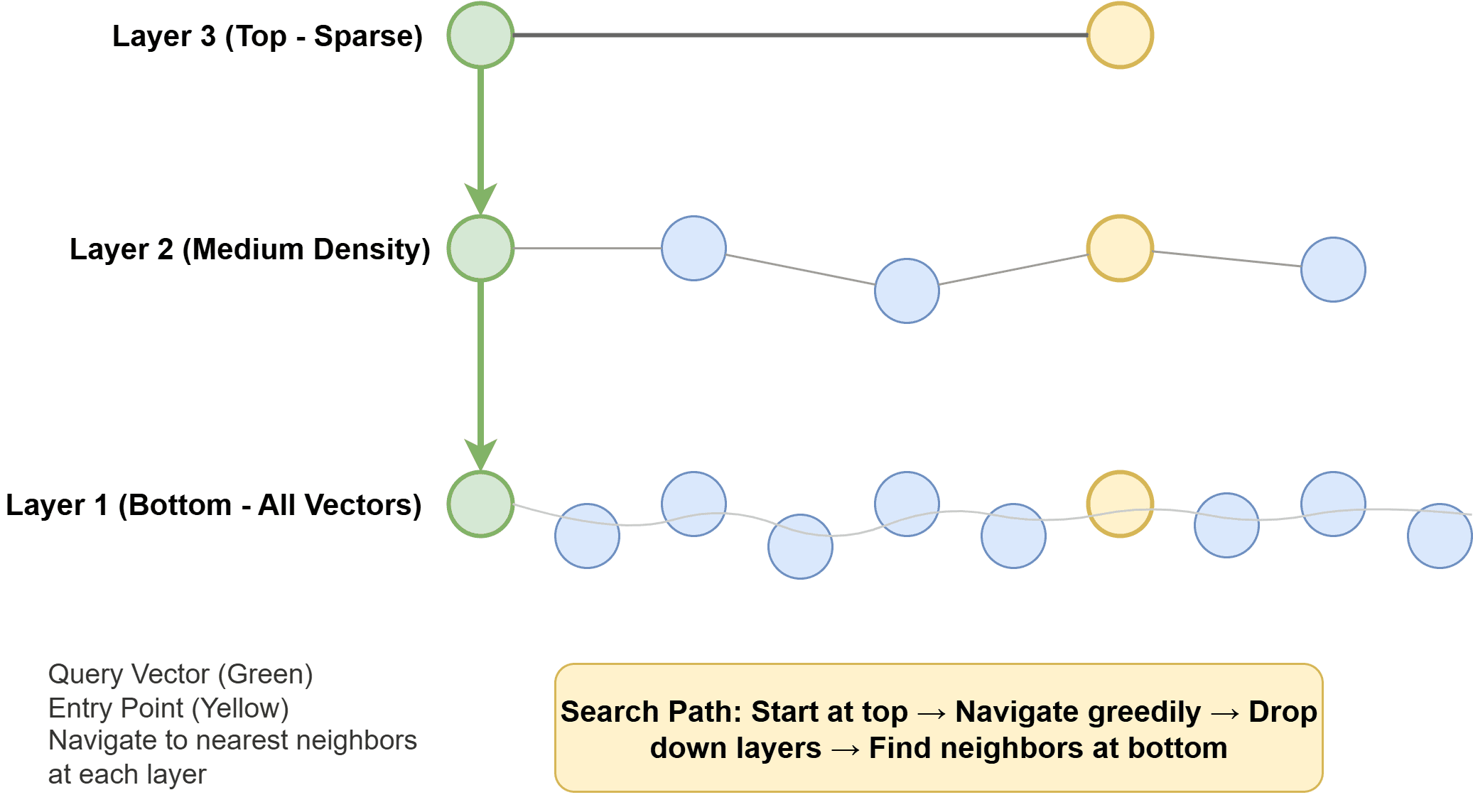
How Hierarchical Navigable Small World Works
Inverted file index (IVF) clusters vectors into groups using k-means, builds an inverted index that maps each cluster to its members, and then searches only the nearest clusters at query time. IVF uses less memory than HNSW but is often somewhat slower and requires a training step to build the clusters.
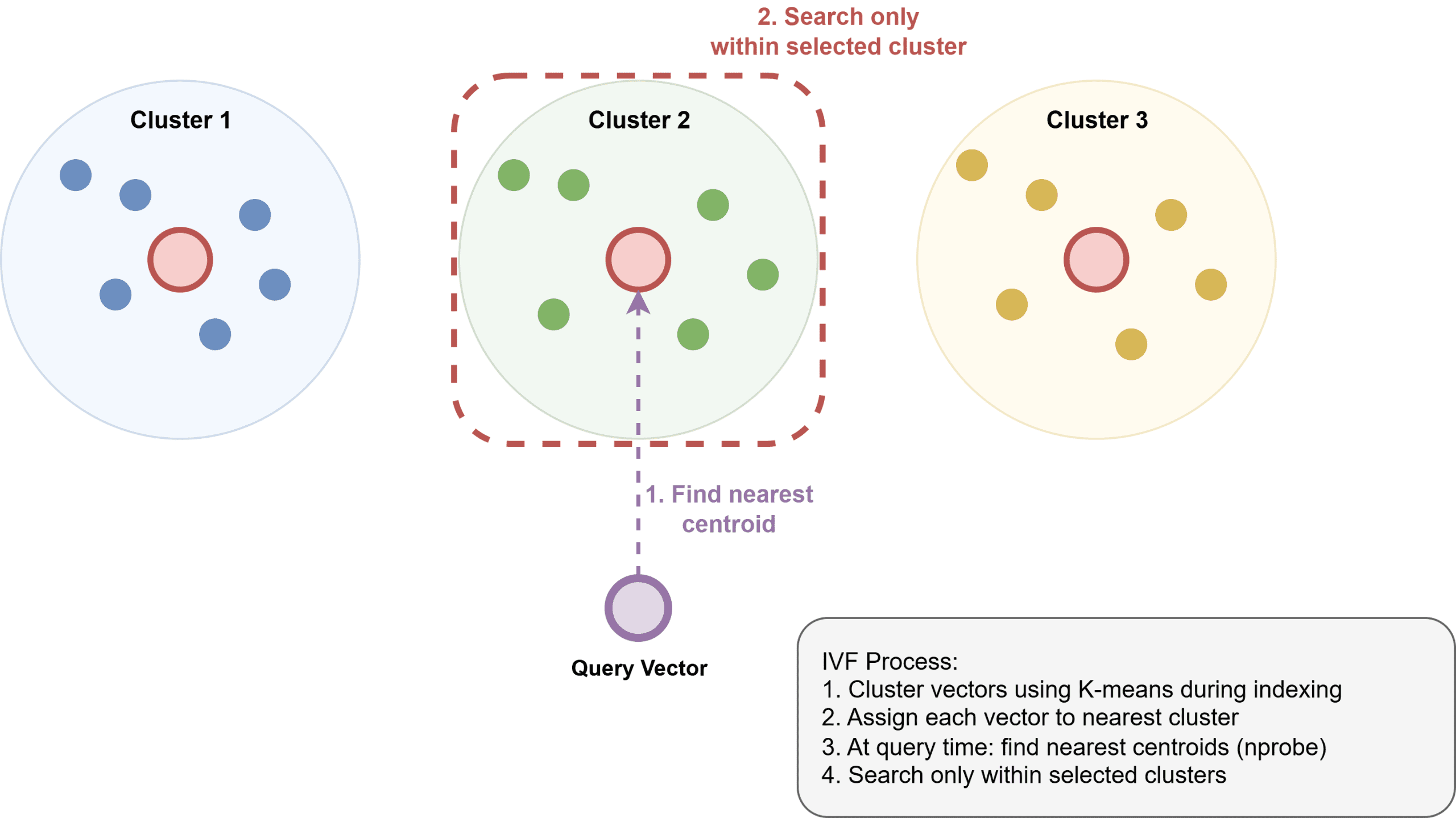
How Inverted File Index Works
Product Quantization (PQ) compresses vectors by dividing them into subvectors and quantizing each one to a codebook. This can reduce memory use by 4–32x, enabling billion-scale datasets. It is often used in combination with IVF as IVF-PQ in systems like Faiss.
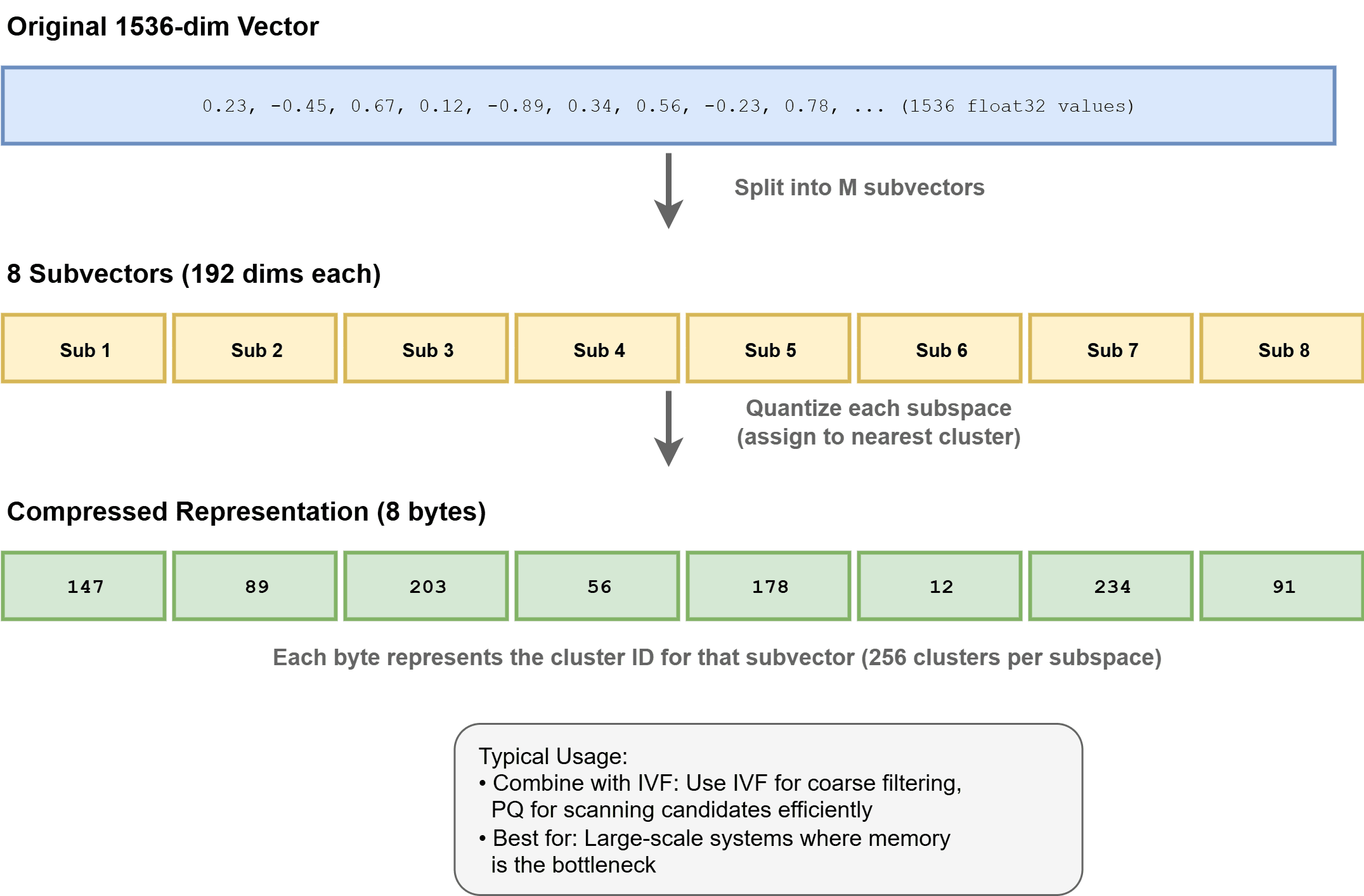
How Product Quantization Works
Index Configuration
HNSW has two main parameters: ef_construction and M:
ef_constructioncontrols how many neighbors are considered during index construction. Higher values generally improve recall but take longer to build.Mcontrols the number of bi-directional links per node. HigherMusually improves recall but increases memory usage.
You tune these based on your recall, latency, and memory budget.
At query time, ef_search controls how many candidates are explored. Increasing it improves recall at the cost of latency. This is a runtime parameter you can tune without rebuilding the index.
For IVF, nlist sets the number of clusters, and nprobe sets how many clusters to search at query time. More clusters can improve precision but also require more memory. Higher nprobe improves recall but increases latency. Read How can the parameters of an IVF index (like the number of clusters nlist and the number of probes nprobe) be tuned to achieve a target recall at the fastest possible query speed? to learn more.
Recall vs. Latency
ANN lives on a tradeoff surface. You can always get better recall by searching more of the index, but you pay for it in latency and compute. Benchmark your specific dataset and query patterns. A recall@10 of 0.95 might be great for a search application; a recommendation system might need 0.99.
Scale and Sharding
A single HNSW index can fit in memory on one machine up to roughly 50–100 million vectors, depending on dimensionality and available RAM. Beyond that, you shard: partition the vector space across nodes and fan out queries across shards, then merge the results. This introduces coordination overhead and requires careful shard-key selection to avoid hot spots. To learn more, read How does vector search scale with data size?
Storage Backends
Vectors are often stored in RAM for fast ANN search. Metadata is usually stored separately, often in a key-value or columnar store. Some systems support memory-mapped files to index datasets that are larger than RAM, spilling to disk when needed. This trades some latency for scale.
On-disk ANN indexes like DiskANN (developed by Microsoft) are designed to run from SSDs with minimal RAM. They achieve good recall and throughput for very large datasets where memory is the binding constraint.
Vector Database Options
Vector search tools generally fall into three categories.
First, you can choose from purpose-built vector databases such as:
- Pinecone: a fully managed, no-operations solution
- Qdrant: an open-source, Rust-based system with strong filtering capabilities
- Weaviate: an open-source option with built-in schema and modular features
- Milvus: a high-performance, open-source vector database designed for large-scale similarity search with support for distributed deployments and GPU acceleration
Second, there are extensions to existing systems, such as pgvector for Postgres, which works well at small to medium scale.
Third, there are libraries such as:
For new retrieval-augmented generation (RAG) applications at moderate scale, pgvector is often a good starting point if you are already using Postgres because it minimizes operational overhead. As your needs grow — especially with larger datasets or more complex filtering — Qdrant or Weaviate can become more compelling options, while Pinecone is ideal if you prefer a fully managed solution with no infrastructure to maintain.
Wrapping Up
Vector databases solve a real problem: finding what is semantically similar at scale, quickly. The core idea is straightforward: embed content as vectors and search by distance. The implementation details — HNSW vs. IVF, recall tuning, hybrid search, and sharding — matter a lot at production scale.
Here are a few resources you can explore further:
Happy learning!
[ad_2]
Source link


