

Table of Contents
Migrating firewalls can be a complex undertaking, often involving intricate policies, critical applications, and the need for seamless transition. This post distills key insights from experienced architects on best practices for any firewall migration, and then dives into the unique considerations when moving from Palo Alto Networks to Cisco Next-Generation Firewalls.
Section 0: The Background
Customer leadership has decided to migrate from PAN to Cisco. This was a business decision based on increased prices by PAN. Unlike many firewall migration projects CX supports, this engagement had the following complicating factors:
- Lack of current-state documentation.
- Lack of understanding of current identity solution. More specifically, we identified (with effort) that there was a need to make Cisco & PAN co-exist because of many instances of identity-based firewall enforcement.

- Lack of understanding of firewall history (i.e. WHY is there a firewall here/what network segments need isolation).
- Lack of understanding/documentation of applications-and how/where the firewall policy supports the applications.
- 24/7 environment: There is no ‘after-hours’ so every migration effort required significant planning.
Section 1: General Firewall Migration Best Practices
A successful firewall migration hinges on meticulous planning, thorough execution, and diligent post-migration activities. There is no tool that can replace good practices and this section’s intent is to prepare an engineer with skills required to save one’s sanity:
1. Comprehensive Prep Work:
- Pre-migration Cleanup & Optimization: Before you even think about moving, clean up your existing firewall. This includes analyzing rule and NAT hit-counts to identify unused or redundant policies, and performing object de-duplication to streamline configurations. Would you move houses without first decluttering and throwing away trash? If not, why would you move stale or irrelevant firewall policy? A good best practice is to make this something the customer is responsible for. Like moving, you can’t declutter indefinitely, so ensure there is a timeline to which the customer is held accountable to.
- Change Management: Ideally, implement a configuration freeze on the source firewall. If not possible, establish robust change tracking to replicate any new rules or modifications across both the old and new firewalls.
- Stakeholder Engagement: Identify all mission-critical applications and their key stakeholders. Their input is crucial for understanding traffic flows and validating post-migration functionality.
- Documentation is King:
- Develop a detailed Method of Procedure (MOP): Outline every step, including whether you’ll perform a ‘hard’ cutover or an incremental/phased migration. Include clear time objectives.
- Conduct Peer Reviews: Have multiple eyes on your MOP and configurations.
- Create a Thorough Test Plan: This isn’t just about testing applications; it’s about testing your test plan itself. Ensure it covers all critical functionalities and edge cases.
- Design a Rollback Plan: Always have a clear strategy to revert to the previous state if issues arise.
2. Flawless Migration Execution:
- Conduct a ‘Dry-Run’: If possible, simulate the migration in a test environment to identify potential issues before the actual cutover.
- Validate ARP Tables: Check ARP tables both before and after the migration to ensure proper network connectivity.
- Optimize Critical Traffic: Develop pre-filters or ‘fastpath’ rules for critical applications to ensure their performance isn’t impacted.
- Pre-stage Monitoring Tools: Prepare custom searches and packet captures in advance to quickly diagnose issues during the migration.
- On-Call Support: Have application testers and owners readily available or on a dedicated call during the migration window. Important note: These MAY NOT be the same people. Often, we were given testers, who lacked any understanding of how the application worked. Ensure it is well documented where this experience lives. Source/destination IPs & L4 ports-who knows these low-level details?
3. Post-Migration Activities for Stability & Optimization:
- Review Post-Migration Reports: Thoroughly analyze any reports generated by migration tools to identify and address lingering issues.
- Update Documentation: Ensure all network diagrams, policy documents, and operational procedures are updated to reflect the new firewall configuration.
- Continuous Monitoring: Implement robust monitoring to track performance, security events, and potential anomalies.
- Training and Support: Educate your operations team on the new platform and its management.
- Ongoing Optimization: Firewall policies are not static. Regularly review and optimize rules to maintain efficiency and security posture.
End-to-End Migration Procedure (General Steps):
- Download and launch the migration tool.
- Export the source firewall’s configuration file.
- Review the pre-migration report.
- Map interfaces, security zones, and interface groups.
- Map configurations with applications.
- Specify destination parameters and select features for migration.
- Optimize, review, and validate the migrated configuration.
- Push the migrated configuration to the new firewall’s management center (e.g., FMC).
- Deploy the configuration to the firewall.
- Download and review the post-migration report.
- Configure any additional manual items.
Section 2: Key Differences and Migration Strategies from Palo Alto to Cisco Next-Generation Firewalls
Migrating from Palo Alto Networks to Cisco Secure Firewall brings its own set of nuances, particularly concerning identity integration, policy conversion, and platform-specific capabilities.
- Identity Coexistence During Migration:
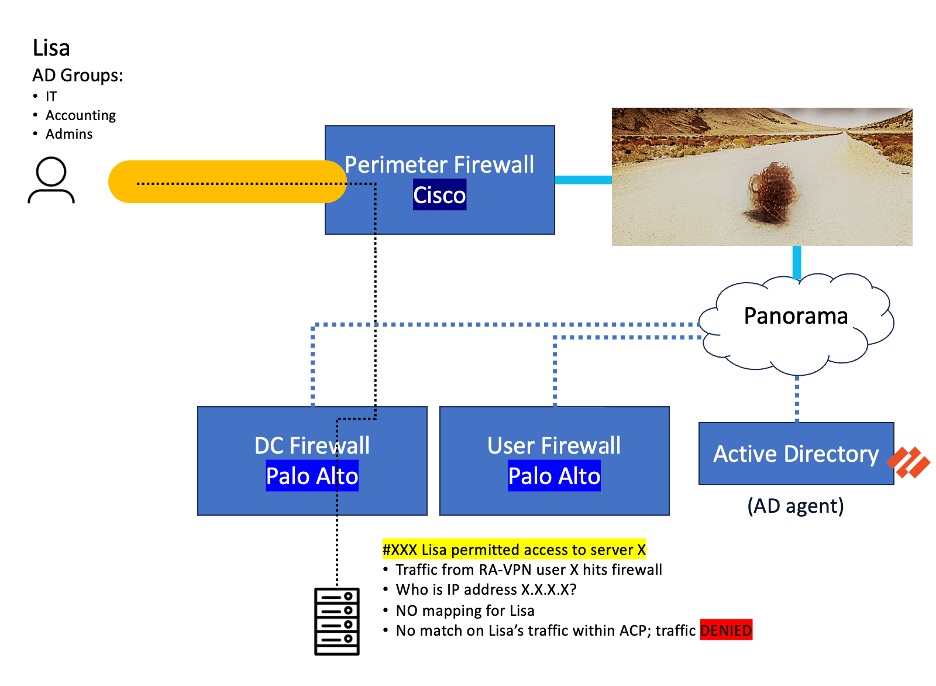
A significant challenge is ensuring user identity mappings (e.g., “Lisa is 10.14.10.7”) are consistent across both Palo Alto and Cisco firewalls during the interim migration period.
- The Problem: Cisco needs to be aware of user-to-IP mappings that Palo Alto’s User-ID agents or VPN gateways already know. Without this, traffic from identified users might be denied by the Cisco firewall because it lacks the necessary context.
- Solutions Explored:
- Dedicated ISE-PIC Deployment: While attempted, using an existing ISE deployment for this purpose can be problematic, especially since PassiveID is incompatible with 802.1x Machine Authentication. Note: ISE-PIC has reached End-of-Life.
- Syslog Forwarding: A viable strategy involves configuring the Palo Alto VPN firewall to forward Syslog messages containing user-to-IP mappings to Cisco ISE.
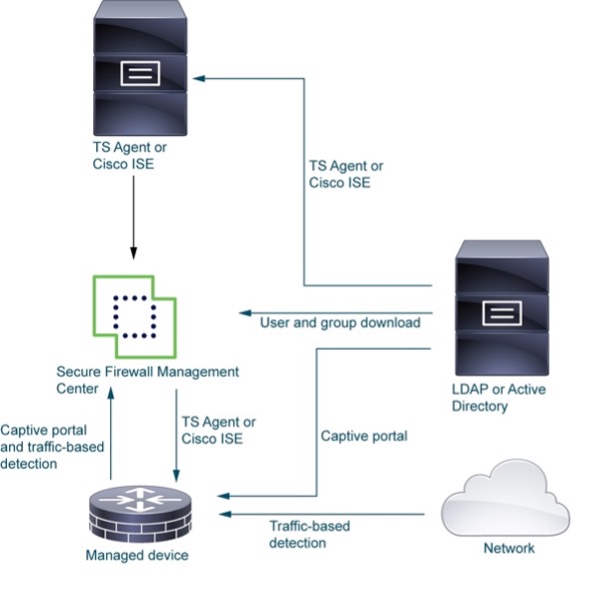
- Active Directory Agents: Deploying agents on Active Directory servers or terminal servers can help both platforms gather identity information.
By including a mix of syslog forwarding on the PAN VPN firewall and new Cisco agents on the customer AD servers, we were able to migrate a downstream PAN firewall to Cisco.
Should users be coming from on-premise (passive authentication) or via remote-access VPN, the Cisco firewall will have a user->IP mapping to make sure the appropriate firewall policy is being matched.
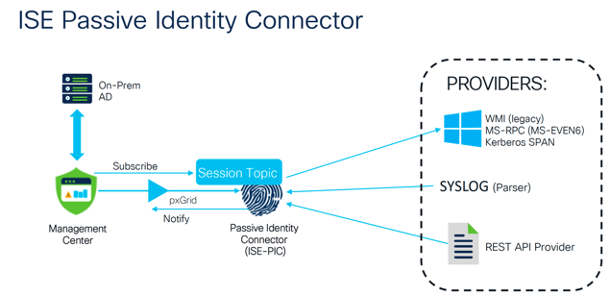
As of Firewall Management Center 7.6, the passive ID functionality is available directly without the need for ISE-PIC (which went EOL on 5/5/2025).
2. Policy Conversion with the Secure Firewall Migration Tool:
The Cisco Secure Firewall migration tool is designed to assist with this transition, but understanding its capabilities and limitations is key.
-
- Extraction & Combination: The tool can extract and combine Palo Alto configurations, identifying elements like Access Control rules, Network/Port objects, Interfaces, Routes, and Applications.
- Feature Selection: You can select which components of the configuration (e.g., Interfaces, Routes, Access Control) to migrate.
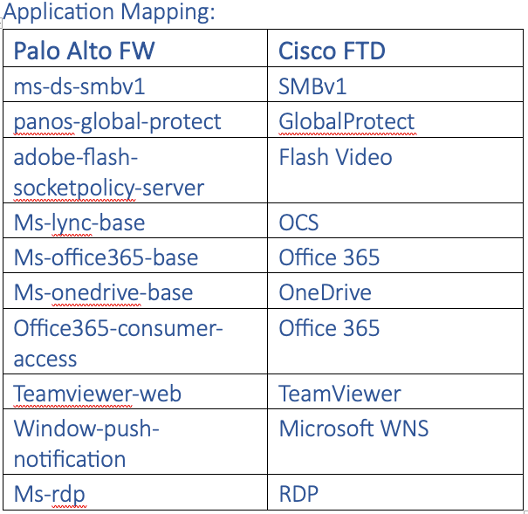
- Application Mapping: It’s crucial to resolve any blank or invalid application mappings. In some cases, you might need to add port-based equivalents if a direct application mapping isn’t available. Resources like Cisco AppID and Palo Alto’s Applipedia can help.
- Bulk Actions & Optimization: The tool facilitates bulk actions and allows for ACL optimization, but remember to pre-stage File and IPS policies in the Cisco Firepower Management Center (FMC).
 3. Palo Alto Configuration Limitations for Migration:
-
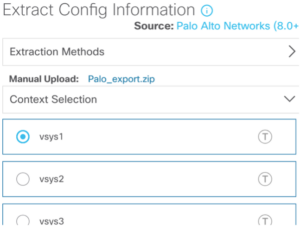
- PAN-OS Version: The source Palo Alto firewall must be running PAN-OS software version 8.0 or higher for the migration tool to function correctly.
- VSYS Migration: The tool supports migration of either single or multi-vsys configurations, which are typically merged with VRFs to achieve segmentation in Cisco FTD.
- System Configuration: Critical system configurations, such as Platform Policies (e.g., NTP, SSH access) in FTD, are generally not migrated by the tool and require manual setup.
4. Specific Challenges and Manual Configurations:
Several elements require manual attention or have different implementations between the two platforms:
- NAT IP and Port Oversubscription: Palo Alto can handle higher levels of NAT oversubscription (e.g., 1x, 2x, 4x, 8x reuse of same address/port). When migrating to Cisco, you often need to increase the PAT pool size to accommodate this.
- URL Wildcards: Palo Alto uses characters like * or ^ for URL wildcards, whereas Cisco typically supports substring matching (e.g., cisco.com instead of *.cisco.com). These need adjustment.
- Nested Object Groups: Network and port object groups nested deeper than 10 levels are not supported in Cisco FMC and will need flattening.
- Identity Realm/Active Directory Integration: While newer versions of the migration tool (FMT 7.7+) support AD/Realm integration, you’ll often need to manually add identity to applicable rules and pre-stage the Realm and AD configurations in the FMC.
- NAT Source Replacement: Manually replace NAT source in Access Control Policy (ACP) rules with the NAT destination (i.e., swap the translated address with the original destination).
- Unmigrated Items Requiring Manual Configuration:
- Time-based access control rules. Cisco does not currently support time-based access control rules.
- Identity-based access control rules: You’ll need to explicitly associate identity groups or individual identities.
- FQDN objects: Especially those starting with or containing special characters. Wildcard FQDNs often need replacement or updates.
- URL Filtering Policies: Add the respective categories as policies using URL filtering might not translate directly.
- Application Mapping: If a rule in Palo Alto used “application default” for service, it will likely be migrated as “any” service in Cisco, requiring manual refinement. In some case we added port-based equivalents.

-
- Negate Rules: Palo Alto’s “allow X but exclude Y” logic needs to be translated into explicit “deny” rules in FTD. Cisco does not currently support negate rules. This was accomplished by simply implementing a ‘deny’ rule in FTD.
- Dynamic Routing: Requires manual configuration. This will not be ported via the migration tool.
- Route Reflector: Add FTD as an eBGP peer manually. More specifically, cisco does not currently (as of this blog posting) support iBGP route reflector configuration. This was overcome by manually configuring a new eBGP autonomous number for the firewall. This also required the additional configuration of ‘allow-as in’ as there were instances where route propagation hair pinned the firewall.
5. Partially Supported, Ignored, or Disabled Items:
Be aware that certain configurations are not fully supported or are ignored during migration:
- Management Settings (like NTP, SSH access).
- Syslog Dynamic Routing.
- Service Policies (these often translate to FlexConfig in FTD).
- Remote-Access VPN reserved IP addresses (require workarounds via ISE or AD).
- Device-Specific Site-to-Site VPN configurations.
- Connection log settings.
By adhering to general best practices and understanding these specific differences when migrating from Palo Alto to Cisco Next-Generation Firewalls, organizations can achieve a smoother, more secure, and efficient transition.